

AI Video Analytics & VMS for Any Industry
Advanced VMS platform with AI video analytics for security, safety, and operational efficiency across all industries. Combine video and intelligent insights in one system for faster decisions and complete control.
Integrated with leading platforms & hardware
Incoresoft VMS
Advanced VMS platform with AI video analytics for security, safety, and operational efficiency across all industries. Combine video and intelligent insights in one system for faster decisions and complete control.
Explore VMS Platform →The AI Platform Built for Operators, Not Labs
Real deployments. Real performance. Zero camera upgrades required.
Specialized AI Engines
Purpose-built models for faces, vehicles, safety, and operations - not generic CV.
Real-Time Processing
Neural inference runs in under 50ms per frame. Alerts reach operators before humans notice.
Deployment Modes
On-premise for data sovereignty. Cloud for scale. Hybrid for both. Your infrastructure, your rules.
Camera Compatible
Any IP camera, ONVIF stream, or CCTV feed. No hardware swap, no rip-and-replace.
Our Products
Advanced AI-powered video analytics modules for any environment
Face Recognition
AI face recognition solution identifies people in live streams, matches them to authorized lists, and delivers privacy-conscious analytics for security, parking, attendance and retail insights.
Hard Hat Detection
Safety on construction and industrial sites isn’t just about rules - it’s about protecting lives. Every year, preventable accidents occur because helmets aren’t worn. IncoreSoft’s AI Hard Hat Detection system is designed to eliminate that risk.
License Plate Recognition
Boost safety, automate parking, and streamline traffic operations with IncoreSoft’s advanced automatic license plate recognition (ALPR/ANPR) solution.
Smart Video Analytics
Smart VA is an advanced AI-driven video analytics plugin designed to enhance surveillance and security management through customizable detection, multi-camera search, event notifications, and intelligent integration with analytics tools.
Smoke & Fire Detection
Video analytics solution identifies smoke and fire at the earliest possible stage and triggers instant alarms to your computer, mobile, or via email. With proactive fire and smoke detection, you can reduce losses, respond faster, and protect lives and assets.
UIC & Container
Detect UIC wagon and container numbers in motion, track wagons across yards and corridors, and get real-time alerts when a specific wagon appears where it shouldn’t.
Need something custom? Talk to our team →
See AllHow VEZHA AI Engine Works
From camera to insight in milliseconds
Camera Input
Any IP camera or video stream connects via RTSP/ONVIF protocol
AI Processing
Real-time deep learning models analyze every frame at <50ms latency
Real-Time Alerts
Instant notifications via webhook, email, or integrated VMS systems
Analytics Dashboard
Comprehensive reporting, heatmaps, and business intelligence exports
Camera Input
Any IP camera or video stream connects via RTSP/ONVIF protocol
AI Processing
Real-time deep learning models analyze every frame at <50ms latency
Real-Time Alerts
Instant notifications via webhook, email, or integrated VMS systems
Analytics Dashboard
Comprehensive reporting, heatmaps, and business intelligence exports
Industry Solutions
Tailored AI video analytics for every sector
IncoreSoft Smart City Solutions for Urban Safety
Every city wants to feel safe — from quiet neighborhoods to busy downtowns. But safety today isn’t just more cameras; it’s smarter cameras, smarter analytics, and smarter responses. IncoreSoft takes traditional CCTV and turns it into an active public-safety platform: license-plate reading, face alerts, object detection, and traffic intelligence all working together.
AI-Powered Retail Analytics
Are you a retail owner wondering how to squeeze more revenue from the same square footage? IncoreSoft helps you do exactly that — with AI video analytics that read the story your store’s cameras are already filming every day.
AI Video Analytics for Industrial Digital Transformation
Industry today runs on speed, safety, and visibility. Yet many businesses still rely on fragmented systems, manual checks, and delayed incident reporting. That gap is exactly where digital transformation in industry begins.
Protecting Students with Smart Analytics from IncoreSoft
What could be more important than the safety of our children? When students walk onto campus, parents and school leaders expect peace of mind. At IncoreSoft, we build smart video analytics and access-control solutions that turn that expectation into measurable results — without turning your school into a fortress.
AI Video Analytics for Public Transportation
Crowded platforms, busy airports, and packed buses — public transportation is the circulatory system of modern cities. But how do you keep that system moving safely and efficiently? Enter digital transformation in transportation: a mix of AI, edge computing, and smart video analytics that turns cameras and sensors into active guardians.
Private Property Security: AI Video Analytics by IncoreSoft
AI-powered video analytics turn passive footage into actionable alerts: licence plates automatically logged at entries, suspicious behaviour flagged in real time, and smoke detected before a small spark becomes a catastrophe.
Deployed Across Industries
Our solutions adapt to your sector's specific requirements
Enterprise-Grade Architecture
Built for scale, reliability, and seamless integration
Blog
Insights on AI video analytics and smart security
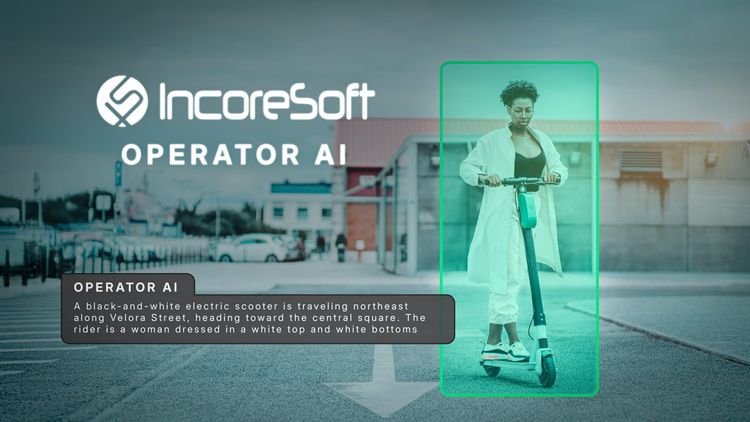
AI vs Traditional Video Monitoring: Key Differences Explained in Depth
Explore the key differences between AI and traditional video monitoring. Learn from real-world cases, expert insights, cost analysis, and AI video analytics solutions by IncoreSoft.

How AI improves workplace safety in industrial facilities
Learn how AI is improving workplace safety in industrial facilities using real-world examples, proven tools, and expert insights. Learn how computer vision, predictive analytics, and AI platforms like IncoreSoft are reducing accidents and protecting workers.
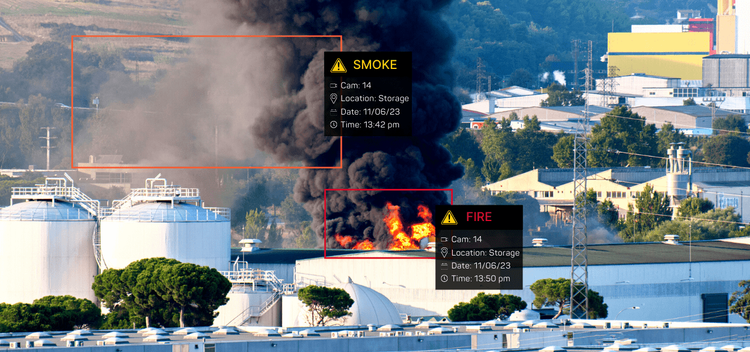
Fire & Smoke Detection Using Computer Vision
Fire doesn’t wait. One spark, one overlooked wisp of smoke, and suddenly a small incident becomes a full-blown disaster.
Ready to transform your business?
Join 100+ companies using IncoreSoft AI video analytics to secure, optimize, and grow.