
How to Integrate AI Video Analytics with Your Existing CCTV
Learn how to integrate AI-powered video analytics with your existing video surveillance systems. Learn real-world tools, use cases, expert insights, and proven strategies to improve security without replacing cameras.
You don't need new cameras to get AI video analytics. Most IP cameras installed in the last decade can feed an AI engine today, and analog cameras can join through an encoder. This guide explains what your cameras need, how the integration works, which deployment model fits, and how to roll it out without disrupting the security system you already run.
Key takeaways
- AI analytics is a software layer added on top of existing cameras and VMS, not a replacement.
- The minimum requirement is a stable RTSP stream; ONVIF Profile S or T makes setup much easier.
- Image quality per task matters more than camera age: counting people needs far fewer pixels than recognizing faces or plates.
- Start with a 4–8 week pilot on a few cameras, measure false alarms and response time, then scale.
Why add AI to the CCTV you already have
Traditional CCTV records everything and understands nothing. Someone must watch live feeds or scroll through hours of footage after an incident. AI video analytics turns the same cameras into sensors that detect, classify and alert in real time.
Organizations retrofit rather than replace for four reasons:
- Cost. Cameras, cabling and installation are typically the largest share of a CCTV budget. Reusing them leaves budget for analytics.
- Staff shortages. One operator cannot watch dozens of screens; AI filters them down to the events that matter.
- From review to response. Alerts arrive while an incident is happening, not after.
- Business data. The same cameras that protect a site can count visitors, measure queues and check safety rules.
[Insert one real IncoreSoft result here, e.g. "At a logistics client in [country], alert-to-response time fell from X to Y minutes after we connected 120 existing cameras to VEZHA."]
How AI video analytics connects to existing CCTV
Think of the cameras as eyes and the AI engine as the brain. The flow has four steps:
- Capture. Existing cameras keep recording as before.
- Stream. The AI engine pulls a video stream from each camera (usually RTSP) or from your VMS, in parallel with recording.
- Analyze. Neural network models process frames and detect people, vehicles, objects, faces, plates or events.
- Act. Detections become alerts, VMS bookmarks, dashboard metrics, or triggers for access control, PA and other systems.
With VEZHA AI Engine and IncoreSoft VMS, analytics and video management run in one platform, so operators see the alert and the footage side by side.
Will my cameras work? Requirements checklist
Camera age matters less than these five things:
|
Requirement |
What to check |
Why it matters |
|---|---|---|
|
Stream access |
RTSP URL or ONVIF Profile S/T support |
The AI engine needs a live stream it can read |
|
Resolution and pixel density |
Pixels per meter on the target at the needed distance |
Detection needs few pixels; face and plate recognition need many |
|
Frame rate |
5–10 fps is usually enough for analytics |
Higher fps adds load without improving most detections |
|
Lighting and angle |
Night performance, IR, backlight, mounting height |
Poor angle or glare cause misses no model can fix |
|
Network |
Bandwidth from camera to the AI server |
Many HD streams over a weak link drop frames |
A practical guide to pixel density, based on the DORI levels of the IEC 62676-4 standard:
- Detect a person or vehicle (intrusion, loitering, counting): about 25 px/m
- Observe activity and behavior (PPE, fights, falls): about 60 px/m
- Recognize a known person: about 125 px/m
- Identify a person or read a plate: about 250 px/m
Analog cameras: connect them through a video encoder that converts the signal into an IP stream. Expect good results for detection and counting; recognition tasks may require replacing selected cameras at entrances.
Cameras already in a third-party VMS: the AI engine can take streams from the VMS or directly from cameras, and send events back to the VMS. Confirm your VMS integration options before the pilot.
Edge, cloud or hybrid: choosing the deployment model
Edge AI
Analytics run on a local server or edge device near the cameras. Video never leaves the site.
Best for: low latency, unstable internet, privacy-sensitive sites such as hospitals, schools and factories.
Cloud AI
Streams are sent to a cloud platform for analysis.
Best for: many small locations, fast rollout, teams without on-site IT.
Hybrid AI
Real-time detection at the edge; long-term analytics, search and reporting in the cloud or a central data center.
Best for: multi-site organizations that need both fast alerts and cross-site insight.
|
Factor |
Edge AI |
Cloud AI |
Hybrid AI |
|---|---|---|---|
|
Latency |
Very low |
Medium |
Low |
|
Internet dependency |
Low |
High |
Medium |
|
Privacy control |
High |
Medium |
High |
|
Scalability |
Medium |
High |
High |
|
Upfront cost |
Higher (hardware) |
Lower |
Medium |
|
Running cost |
Lower |
Higher (bandwidth, subscriptions) |
Balanced |
Step-by-step: integrating AI analytics into existing CCTV
- Define the goals. List 2–3 problems to solve (e.g. perimeter intrusion at night, queue length at checkouts, missing hard hats). Each goal maps to a specific analytics module.
- Audit cameras and network. Record model, resolution, stream protocol, field of view and bandwidth for the cameras that cover those goals. Flag cameras that need repositioning or replacement.
- Choose the deployment model. Edge, cloud or hybrid, based on privacy rules, connectivity and number of sites.
- Size the hardware. The number of streams per server depends on the models, resolution and frame rate. Size it from the pilot, not from a datasheet.
- Run a pilot. Connect 5–20 cameras for 4–8 weeks. Tune zones, schedules and sensitivity.
- Measure results. Track false alarms per camera per day, detection rate on known events, and operator response time against the baseline.
- Integrate workflows. Send events to the VMS, access control, alarm panels, ticketing or BI tools so alerts lead to action.
- Scale and maintain. Roll out by site or zone, review accuracy monthly, and retrain or adjust when scenes change (new layout, seasons, lighting).
Key use cases
Security and threat detection
- Perimeter intrusion and line crossing
- Loitering and abandoned objects
- Unauthorized access and tailgating
- Weapon detection and face recognition at entrances
Replacing simple motion detection with object classification removes most alerts caused by shadows, rain, animals and moving trees.
Retail
- Foot traffic counting and conversion rate
- Dwell time and zone heatmaps
- Queue length alerts
- Suspicious behavior near high-value shelves
See AI video analytics for retail.
Industry and workplace safety
- Missing PPE (helmets, vests)
- Entry into restricted or hazardous zones
- Fire and smoke detection in open areas and warehouses
See AI video analytics for industry.
Transportation and smart cities
- Fare evasion detection
- Vehicle and traffic analytics
- Crowd density monitoring
See Safe City and Public Transportation.
Healthcare and education
- Patient fall detection
- Restricted area access
- Perimeter and entrance monitoring at schools (Education)
Common integration challenges and how to solve them
Camera compatibility
Most issues come from non-standard streams or locked firmware. ONVIF Profile S/T compliance solves most of them; for the rest, use the manufacturer's RTSP URL or take the stream from the VMS.
Too many false alarms
Usually caused by wide zones, wrong sensitivity or poor camera angles, not by the model. Narrow detection zones, add schedules, and fix camera placement during the pilot.
Privacy and compliance
In the EU, video analytics falls under GDPR, and biometric systems such as face recognition carry extra obligations under the EU AI Act. Keep processing on-premises where possible, minimize stored data, use masking or anonymization where identification is not needed, and document a data protection impact assessment. In US healthcare settings, HIPAA rules also apply.
Model accuracy over time
Scenes change: new shelving, seasonal light, snow. Review accuracy regularly and adjust or retrain models on real footage from your site.
How IncoreSoft helps
IncoreSoft builds end-to-end video analytics on top of existing infrastructure:
- VEZHA AI Engine with ready-made modules for security, retail, transport and industry
- IncoreSoft VMS to manage video and analytics events in one interface
- Integration with legacy CCTV and third-party systems through RTSP and ONVIF
- Custom models when a standard module doesn't fit your scene or task
Want to know what your current cameras can do? Request a free camera audit and pilot plan.
FAQ
Can AI video analytics work with old CCTV cameras? Yes, if the camera provides a usable stream. IP cameras with RTSP or ONVIF usually connect directly. Analog cameras need a video encoder. Image quality, not age, decides which analytics will work.
Do I need to replace my VMS? No. The AI engine can work alongside your current VMS and send events to it. You can also move to IncoreSoft VMS to manage video and analytics in one place.
How much does it cost to add AI to existing CCTV? Cost depends on the number of cameras, the analytics modules, and the deployment model (edge hardware vs cloud subscription). Because cameras and cabling are reused, it is usually far cheaper than a new system. [Add typical price range or "from X per channel" if the team approves.]
How long does integration take? A pilot on a few cameras can start within days to weeks. Full rollout depends on the number of sites and integrations. [Confirm typical timeline.]
Is edge or cloud better? Edge is better for privacy, latency and unreliable internet. Cloud is better for many small sites and fast rollout. Hybrid combines both.
Is AI video analytics GDPR-compliant? It can be. On-premises processing, data minimization, anonymization and clear retention rules are the main measures. Face recognition requires a stronger legal basis and extra safeguards.
Conclusion
Adding AI to existing CCTV is the fastest way to get more value from cameras you already paid for. Start with clear goals, check your cameras against the requirements, run a short pilot, and scale what works. If CCTV is the eyes, AI is the brain, and connecting them no longer requires starting from scratch.
Related reading: The power of video search with artificial intelligence · How video surveillance can protect your perimeter from fire
Read also
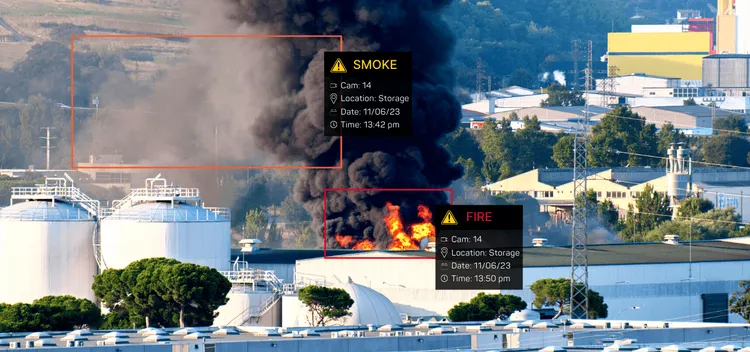
Fire & Smoke Detection Using Computer Vision
Fire doesn’t wait. One spark, one overlooked wisp of smoke, and suddenly a small incident becomes a full-blown disaster.
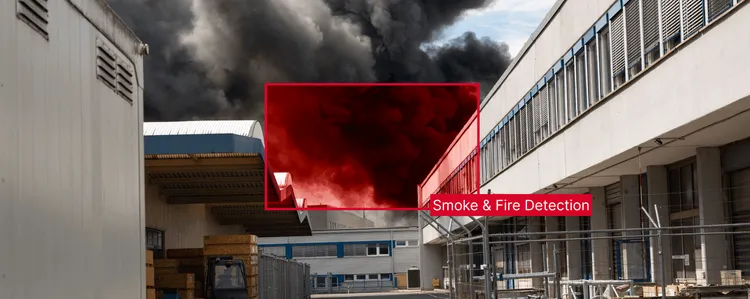
How video surveillance can be your perimeter fire protection
Traditional fire alarm systems often don’t detect fires in open areas.
The power of video search with artificial intelligence
Modern surveillance infrastructure has outpaced the human capacity to use it.
Ready to Get Started?
Fill in the form and our team will get back to you shortly.